
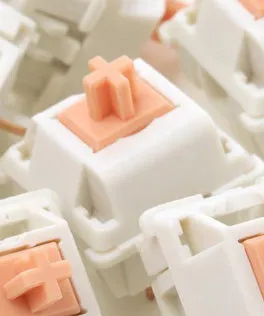
DIY mechanical keyboard shaft Panda shaft single component, tactile mechanical keyboard switch for custom keyboard building and keyboard modification projects


DIY mechanical keyboard shaft Panda shaft single component, tactile mechanical keyboard switch for custom keyboard building and keyboard modification projects
Panda mechanical keyboard shaft tactile switch for DIY keyboard building projects

This Panda mechanical keyboard shaft provides a single switch component for users creating or modifying their own mechanical keyboards. As a tactile switch type, it offers a noticeable bump during actuation without the audible click found in clicky switch variants. The single component format allows keyboard builders to replace individual switches or create custom keyboard layouts with mixed switch types according to personal preference and typing needs.
Features and Construction

The Panda shaft follows standard mechanical keyboard switch dimensions for compatibility with most mechanical keyboard housings and PCBs. Its tactile mechanism provides feedback during keypresses, helping users register when a keystroke has been actuated without relying on bottoming out the key.
Material and Build
The switch housing is constructed from plastic materials that house the internal mechanism, while metal contact pins provide the electrical connection to the keyboard's PCB. This standard construction allows for compatibility with both hot-swappable keyboard sockets and traditional soldered installations, depending on your keyboard's design and your preferred installation method.
Size and Practical Fit
With standard mechanical keyboard switch dimensions, this Panda shaft fits keyboard housings designed for MX-style switches. The single component format means you can install individual switches where needed rather than requiring full keyboard sets, making it suitable for repairing specific keys or creating custom layouts with different switch types across the keyboard.
Uses and Placement

The Panda shaft serves multiple roles in mechanical keyboard customization, from complete keyboard builds to targeted modifications of existing keyboards. Its tactile feedback mechanism makes it suitable for typing applications where users want confirmation of key actuation without audible noise that might disturb others in shared spaces.
Event or Professional Use
For mechanical keyboard enthusiasts attending build events or creating keyboards for specific applications, the single switch format allows for precise customization. Tactile switches like the Panda shaft can be particularly useful in office environments or shared spaces where audible keyboard noise might be disruptive, while still providing the feedback some typists prefer over linear switch options.
Everyday Home Use
For home keyboard users building their ideal typing setup, this single component approach allows for testing different switch types before committing to a full keyboard set. The ability to replace individual switches means worn or damaged keys can be addressed without replacing the entire keyboard, extending the useful life of your mechanical keyboard investment.
Benefits and Buying Value
The Panda shaft offers practical advantages for mechanical keyboard enthusiasts through its single component format and tactile switch design. This approach provides flexibility that full switch sets cannot offer, particularly for users with specific preferences for certain keys or those maintaining multiple keyboards with different switch configurations.
Reuse and Low Maintenance
As a single component, this Panda shaft can be moved between keyboards if needed, provided the keyboards have compatible switch mounting systems. The ability to replace individual switches means maintaining keyboards becomes more cost-effective over time, as only the specific switches that wear out or fail need replacement rather than the entire keyboard.
Why Choose This Product
This Panda mechanical keyboard shaft provides a solution for users who need individual tactile switches rather than full sets. The single component format reduces waste when only specific switches are needed, and allows for greater customization flexibility when building keyboards with mixed switch types across different key positions according to typing patterns and preferences.
